I emailed the developers regarding the problem I was having with Pocket Casts podcatcher. Basically it doesn't play any of the podcasts, whether downloaded or streamed. The audio player just doesn't work. I have CM7.02, and tried again with CM7.1RC1. Neither worked.
The developer says wait for next version, 2.8. So apparently they are aware of the problems some users are having.
Stay tuned. Interface is nice and clean. If it plays, I'll be much more impressed.
http://www.appbrain.com/app/pocket-casts/au.com.shiftyjelly.pocketcasts
Showing posts with label Podcast. Show all posts
Friday, July 1, 2011
Monday, June 27, 2011
AAQR: Pocket Cast (free on Amazon for 27-JUN-2011, else paid) Podcatcher
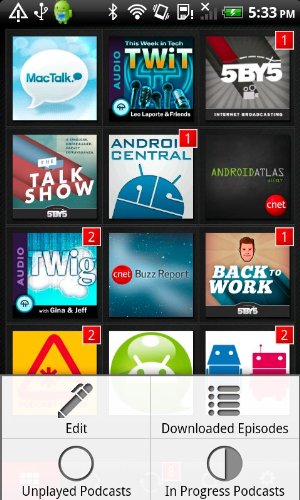
| Pocket Casts Library Screen screenshot via Amazon Appstore |
Upon entering the app, you're presented with a mere 5 buttons along the bottom. It's clean, and the initial "help" screen explains that those buttons are.
Library -- index of all your podcasts subscribed to, with a number indicating how many episodes are available.
Listen -- which podcast is playing (video or audio)
Refresh -- presents which subscriptions have downloads available, and whether to stream or download offline
Search -- add new subscriptions to your library
Setup -- settings and whatnot
The interface is VERY clean, so the initial impression is very good. However, the problem here is mostly under the hood.
I start by adding some of my own favorite podcasts.
The search interface is not bad, as you can search, browse by subject, browse by network (TWIT, CNET, NPR, etc.) There is an "import" function but it asks you to import the OPML file manually by looking for a .TXT file. Huh?! This is Android, not DOS! I mean, this doesn't even integrate with Google Reader! Still, this is how most podcatchers operate. However, the interface leaves a little to be desired. Instead of being able to subscribe right from the list view, I must click through to the "detailed description" page of the podcast, and hit "add" from there. This is annoying and not necessary.
I went into settings and things started to look bad. Offline downloads cannot be cleaned up by date (keep only last X epsiodes) or by space (keep only 1 GB worth offline). The ONLY automation you are allowed is delete after full playback. Otherwise, it's deleting the downloads individually, purge all played, or purge all (played or not). The max refresh to find new podcasts is every 3 hours (else it's manual), but this is more of a nitpick. This is starting to get annoying.
I go to the "refresh" screen, and this is where the app starts to really look bad. It automatically picks up 2 episodes (or is that two weeks?) from each podcast stream. You can't adjust this threshold (that I can find). From there, you can choose to download or stream. I chose a few to download, intending to try it out.
In the "library" view, your only choice is 3 x 5 grid view of the "picture" shown as icon. While it's nice and big and readable if there's text inside, not all podcasts use a useful picture WITH description. For example, the podcast "Inspiring Words of Encouragement" just have the guy's portrait, no words at all. Unless I know the stuff intimately, how would I know what podcast that was without clicking through?
So how does it perform when it comes to actually playing a podcast?
Unfortunately, it failed terribly. I cannot get a SINGLE podcast to play, either streaming OR offline. I tried half a dozen different shows, and not obscure shows, but major ones like CNET's Buzz Out Loud, Leo Laporte's The Tech Guy, and so on. NADA. I click on "play", and bounces me right back to the library screen. Else, it force closed (which happened multiple times during testing).
I admit, I have an older phone, OG Droid with CM 7.02 (I have problem with 7.03 keep boot looping on me) However, this should not be an issue. All OTHER podcatchers I tested work just FINE on my OG Droid.
I hate to say this, but this app ain't worth the download, even if it's free. You may have better luck with it on a different Android device, but for me, this app is a total bust.
Rating: skip it (until the bugs get fixed, or if you can try it within 15 minute refund window)
http://www.appbrain.com/app/pocket-casts/au.com.shiftyjelly.pocketcasts
Thursday, April 7, 2011
AAQR: TuneIn Radio
TuneIn Radio is a good online radio player that will also do Podcasts. It has both topical indices AND location indices. It will also pick up your location and give you "nearby" stations.
It seems to have some problem picking up some local channels when my DSL is a bit glitchy, but otherwise it's quite good. Interface is very usable if a bit plain. You can also "bookmark" the favorite stations.
If you want to listen to news or music stations without a radio, this is the app to get.
Rating: get it!
http://www.appbrain.com/app/tunein-radio/tunein.player
It seems to have some problem picking up some local channels when my DSL is a bit glitchy, but otherwise it's quite good. Interface is very usable if a bit plain. You can also "bookmark" the favorite stations.
If you want to listen to news or music stations without a radio, this is the app to get.
Rating: get it!
http://www.appbrain.com/app/tunein-radio/tunein.player
Monday, April 4, 2011
Quick Duel: Google Listen vs. Stitcher Radio
Both Google Listen and Stitcher Radio are for listening to podcasts. However, that's the end of their similarities. Here's a quick impression of both, and I'll reveal what I use later.
Stitcher Radio
Stitcher Radio is an excellent podcast player... If you are on WiFi most of the time and have a phone with PLENTY of memory. The problem is, I have neither... I have the original Droid (with a meager 256MB) and previously I have to use only 3G as I don't have WiFi at home. Thus, my experiences have been getting worse and worse. The reason is half due to my phone: if a call comes in, Stitcher often go pushed out of memory, and thus when it resumes, all of the buffers are gone, and the app have to re-stream the content... over and over. Stitcher also have no "offline" mode where you can use SD card space to pre-load the podcats.
On the other hand, Stitcher lets you sort the providers and shows by topic, provider, search box, and so on. You can also thumbs up/down the podcast, subscribe to it, and so on.
Rating: Try it
http://www.appbrain.com/app/stitcher-news-radio/com.stitcher.app
Google Listen
Google Listen is an official app from Google Labs, and its "discovery/browse" interface is atrocious. You can't browse... Just search. is available, no topic browser at all. Eeek. However, Google Listen is one of the apps that saves your listen position, even if the app was pushed out of active memory then reloaded. It is VERY handy. There are a series of buttons in the player screen that lets you skip ahead and so on.
Furthermore, Google Listen has a few tricks, such as browse the "prior episodes" of any podcast, and you can choose to subscribe or not (i.e. check RSS feed), and or add those episodes to the playback queue.
But the best ability of Google Listen is its ability to download all the relevant information (you can even specify to pre-fetch only while on AC power, and/or only on WiFi). All the pre-fetch podcasts goes into the SD card, so playing them back needs NO bandwidth at all!
Rating: Get it
http://www.appbrain.com/app/listen/com.google.android.apps.listen
Stitcher Radio
Stitcher Radio is an excellent podcast player... If you are on WiFi most of the time and have a phone with PLENTY of memory. The problem is, I have neither... I have the original Droid (with a meager 256MB) and previously I have to use only 3G as I don't have WiFi at home. Thus, my experiences have been getting worse and worse. The reason is half due to my phone: if a call comes in, Stitcher often go pushed out of memory, and thus when it resumes, all of the buffers are gone, and the app have to re-stream the content... over and over. Stitcher also have no "offline" mode where you can use SD card space to pre-load the podcats.
On the other hand, Stitcher lets you sort the providers and shows by topic, provider, search box, and so on. You can also thumbs up/down the podcast, subscribe to it, and so on.
Rating: Try it
http://www.appbrain.com/app/stitcher-news-radio/com.stitcher.app
Google Listen
Google Listen is an official app from Google Labs, and its "discovery/browse" interface is atrocious. You can't browse... Just search. is available, no topic browser at all. Eeek. However, Google Listen is one of the apps that saves your listen position, even if the app was pushed out of active memory then reloaded. It is VERY handy. There are a series of buttons in the player screen that lets you skip ahead and so on.
Furthermore, Google Listen has a few tricks, such as browse the "prior episodes" of any podcast, and you can choose to subscribe or not (i.e. check RSS feed), and or add those episodes to the playback queue.
But the best ability of Google Listen is its ability to download all the relevant information (you can even specify to pre-fetch only while on AC power, and/or only on WiFi). All the pre-fetch podcasts goes into the SD card, so playing them back needs NO bandwidth at all!
Rating: Get it
http://www.appbrain.com/app/listen/com.google.android.apps.listen
Subscribe to:
Posts (Atom)